
TikTok is not only a feed where people scroll through recommended videos.
It also has a search system people use to find videos, creators, hashtags, topics and other content. TikTok's own search documentation describes search as a way to discover specific content as well as trending videos, hashtags and creators. (TikTok Support)
That creates an opportunity for creators.
Instead of making a video and hoping the right audience happens to encounter it, you can create content around questions and topics people are actively looking for.
That is what people generally mean when they talk about TikTok SEO.
TikTok itself does not present a guaranteed “SEO formula.” A practical definition is simply:
TikTok SEO is the process of making a video's topic and purpose clear enough that it can be understood and potentially surfaced for relevant searches.
The important word is relevant.
The goal is not to stuff as many keywords as possible into a caption.
The goal is to make genuinely useful content about a clearly defined topic.
At a glance
- Find a real search topic
- Understand what the searcher wants
- Create a video that directly addresses it
- Make the topic clear in the video and supporting text
- Publish and review search performance
What Is TikTok SEO?
TikTok SEO is a convenient industry term for optimizing content around searches people perform inside TikTok.
Imagine someone searches:
how to clean white shoes
TikTok needs to decide which content may be relevant to that query.
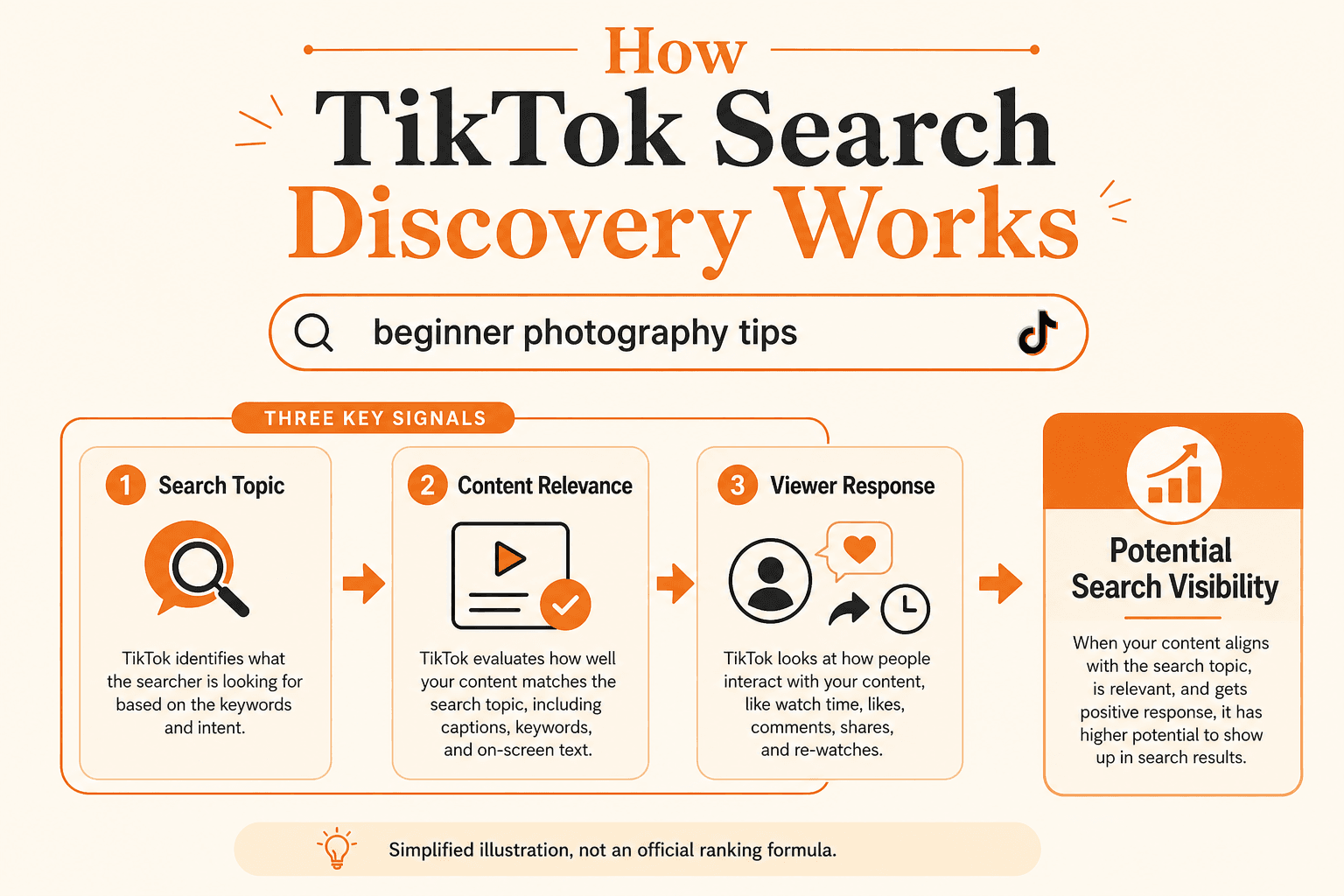
TikTok says its recommendation systems use several categories of information. For Search specifically, content information can include how well a post matches the search inquiry, hashtags and sounds, while user behaviour and other information can also affect recommendations. (TikTok Support)
That means creators should think beyond:
“How do I make this video go viral?”
and also ask:
“What specific question or topic does this video answer?”
That shift is the foundation of useful TikTok SEO.
How Does TikTok Search Work?
TikTok allows users to enter a search and explore matching content, including videos, creators, hashtags and other results. (TikTok Support)
The exact ranking system is not something creators can control directly.
However, TikTok does publicly describe several types of information its recommendation systems may consider.
For search-related recommendations, this can include:
- how closely content matches the search inquiry
- hashtags
- sounds
- previous search behaviour
- content people watch, like, share, comment on or skip
TikTok also says the weight of different factors can vary depending on the recommendation surface. (TikTok Support)
This is why TikTok SEO should not be reduced to putting a keyword in one place.
Search relevance starts with the actual content.
Start With Search Intent, Not Keywords
Before choosing a keyword, understand what the person searching actually wants.
Consider these searches:
- TikTok camera settings
- best TikTok camera settings
- TikTok camera settings for low light
All three involve camera settings.
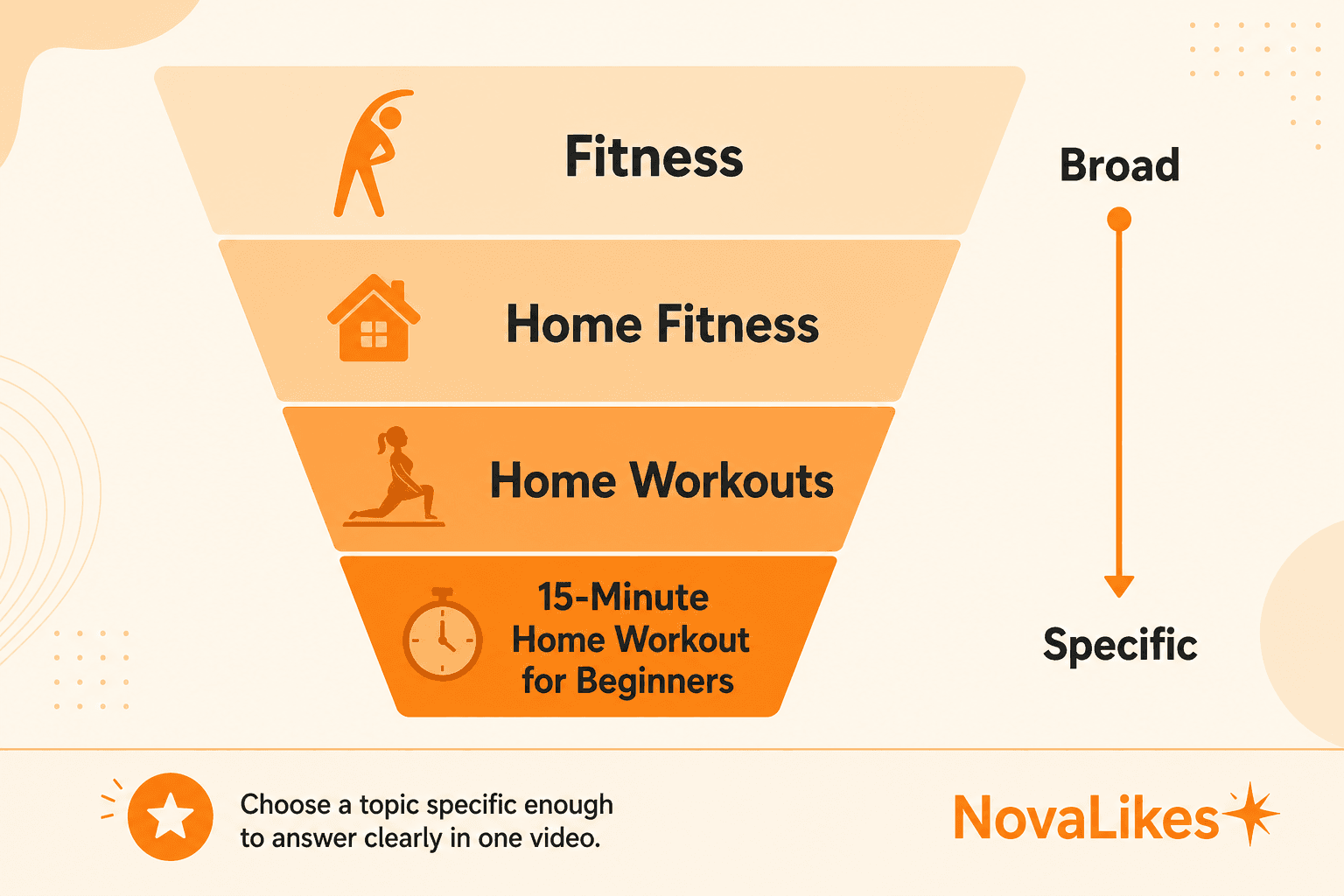
But the intent becomes more specific each time.
Someone searching the third phrase probably does not want a broad introduction to phone cameras.
They want help specifically with low-light filming.
That should influence the video.
A strong search-focused TikTok should answer the actual problem rather than merely repeating the search phrase.
Ask Three Questions Before Creating
1. What is the person searching for?
- Information?
- A tutorial?
- A comparison?
- An explanation?
- A product?
- A location?
2. What would satisfy that search quickly?
If the query asks:
how to remove background in Canva
a ten-minute story about why you started using Canva probably delays the answer.
3. What could they reasonably want next?
- A more advanced tutorial?
- Another example?
- A comparison?
That helps you create useful follow-up content rather than isolated videos.
Use TikTok Creator Search Insights
This is one of the most useful tools TikTok currently provides for search-focused content planning.
Creator Search Insights provides information about topics people search for on TikTok. TikTok says creators can browse frequently searched topics, inspect related searches, identify topics that may have a shortage of content and review search performance for their own posts. (TikTok Support)
That makes it much more useful than randomly guessing keywords.
You Can Use It to Find
Popular searches
Topics people are actively looking for.
Content gaps
TikTok provides a Content gap filter for topics that may be searched often relative to available content. (TikTok Support)
Searches by followers
Where available, Creator Search Insights can also surface searches connected with your followers. (TikTok Support)
Related searches
A broad topic can reveal more specific questions.
Search analytics
TikTok allows creators to review the search performance of their posts and select different date ranges. (TikTok Support)
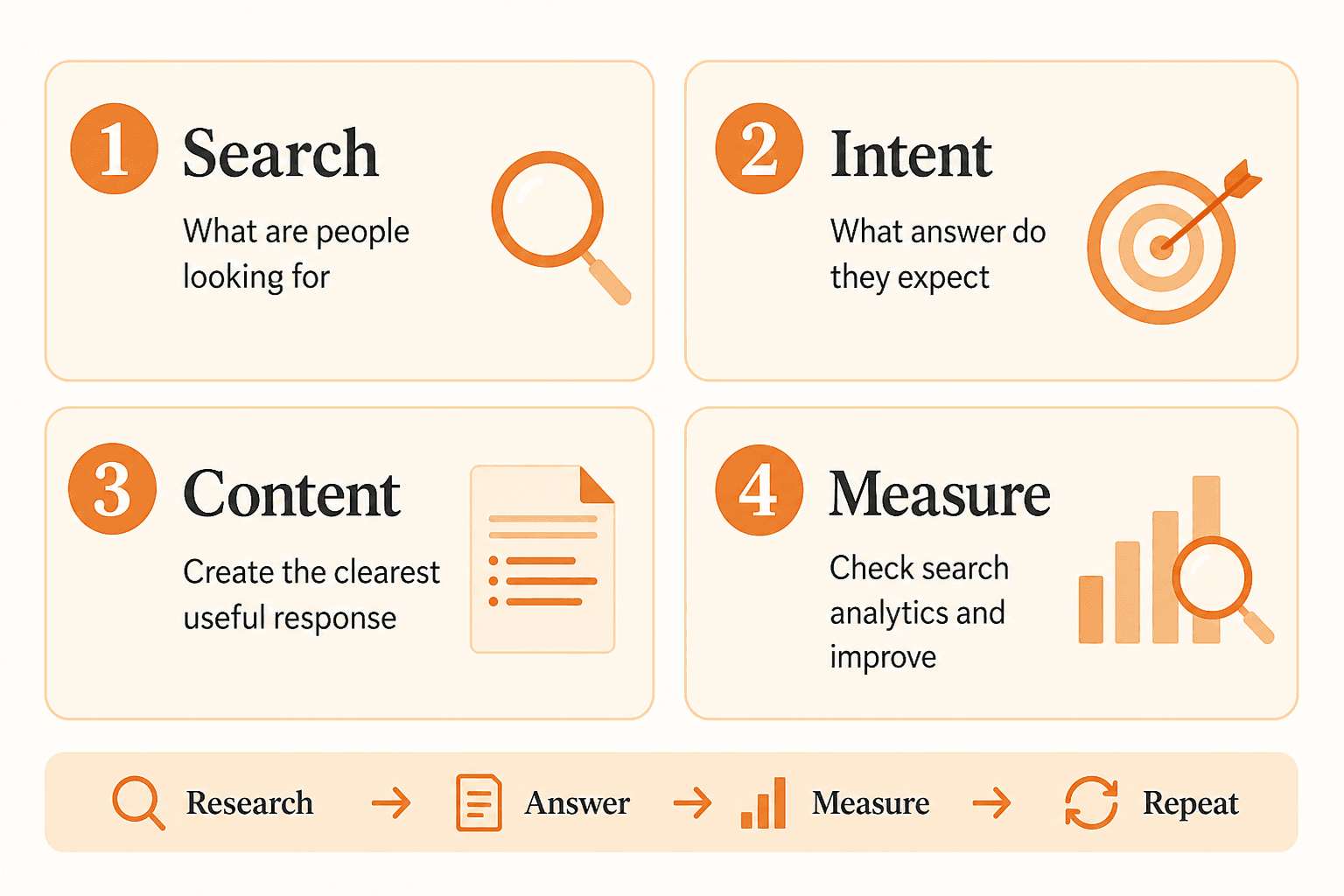
This gives you a loop:
Research → Publish → Measure → Improve
instead of:
Guess → Publish → Guess again
How to Find TikTok Keywords
You don't need hundreds of keywords for one TikTok.
Start with one clear topic.
Suppose your broad subject is:
Instagram photography
Searching around that topic may reveal more specific ideas such as:
- Instagram photo poses
- phone photography tips
- night photography settings
- product photography setup
- photography lighting ideas
The exact available suggestions will change over time, which is why current TikTok search data is more useful than maintaining a static keyword list.
Creator Search Insights is specifically designed to expose current search topics and related search information. (TikTok Support)
Broad Topic vs Specific Search
Compare:
SEO
with:
local SEO for restaurants
and then:
how to optimize Google Business Profile for restaurants
The final topic gives you a much clearer video to create.
Specificity helps both the viewer and the creator understand what the content is actually about.
Put the Main Topic in the Video Naturally
Once you know the search topic, make it obvious what the video is about.
For a video targeting:
how to photograph food with an iPhone
the creator might begin:
“Here are three ways to take better food photos with an iPhone.”
That immediately establishes context.
Compare that with:
“Okay guys, you're not going to believe this…”
The second opening may create curiosity, but it does not immediately identify the subject.
This does not mean every TikTok needs robotic keyword repetition.
It means the topic should be unmistakable.
Write Captions for Humans First
A useful TikTok caption should support the content.
If your video explains:
how to edit TikTok captions
a caption such as:
How to edit TikTok captions after creating your video, plus what to check before posting.
is clearer than:
TikTok captions TikTok caption editing captions TikTok tips viral TikTok
Keyword stuffing makes the text harder to read and does not improve the usefulness of the video.
Because TikTok says content information can contribute to search recommendations, the better goal is clear relevance, not repetition. (TikTok Support)
Do Hashtags Matter for TikTok SEO?
Hashtags can help describe or categorize content, and TikTok explicitly lists hashtags among the content information that can be considered in its recommendation systems. (TikTok Support)
But that does not mean:
more hashtags = higher ranking.
TikTok does not publish such a rule.
A practical approach is to use hashtags that genuinely relate to the video.
For example, a beginner photography tutorial might reasonably use:
- #PhotographyTips
- #PhonePhotography
rather than filling the caption with dozens of unrelated trending hashtags.
The topic should still make sense even if you removed the hashtags entirely.
Does the Sound Affect TikTok Search?
TikTok lists sounds among the content information its recommendation systems may use. (TikTok Support)
That does not mean choosing a trending sound automatically makes a post rank for a search query.
A sound may provide context, but it should not replace topic relevance.
If you're creating an educational search-focused video, clarity should come first.
Should You Say the Keyword in the Video?
Making the topic clear in spoken content can improve the video's clarity for viewers.
For example:
“Here is how to clean white sneakers without putting them in the washing machine.”
is immediately understandable.
I would use this because it creates a better user experience, not because TikTok publicly promises that saying an exact keyword gives a specific ranking boost.
That distinction matters.
Build for the viewer first.
Should the Keyword Appear on Screen?
On-screen text is useful when it helps viewers immediately understand the subject.
For example:
3 Beginner Excel Formulas
is clearer than:
You NEED to know this!
Again, the goal is clarity rather than stuffing.
Do not repeat the phrase unnecessarily across every frame.
Create the Best Answer You Can for the Search
The keyword gets you to the topic.
The content still has to be useful.
Suppose the query is:
how to remove coffee stain from carpet
A useful short-form answer might:
- show the stain
- explain the first step
- demonstrate the method
- show what to avoid
- show the result
That is more useful than spending most of the video saying:
coffee stain removal
over and over.
Search-focused content should still be good content.
Answer the Question Early
People searching usually have a specific reason for doing so.
For informational searches, start addressing the question quickly.
That does not mean every video needs to be five seconds long.
It means avoid unnecessary delay before the useful part begins.
If the video is:
How to turn off Instagram activity status
tell the viewer what they need to do.
Then explain exceptions or additional detail.
Do not hide a simple answer behind a long introduction just to increase video length.
Match the Format to the Question
Different searches deserve different formats.
“What is TikTok SEO?”
An explanation works.
“How to pin a TikTok video”
A demonstration is more useful.
“CapCut vs TikTok editor”
A comparison works.
“Best places to eat in Dubai”
A list, map or location-led format makes more sense.
Do not force every keyword into the same video structure.
The search intent should shape the content.
Use Search Analytics After Publishing
TikTok's Creator Search Insights includes Search analytics, where creators can review how posts are performing in search results. TikTok says creators can view overall posts or posts inspired by Creator Search Insights and choose a date range. (TikTok Support)
This is extremely important.
TikTok SEO should not end when you press Publish.
Review what happens.
Look For Questions Such As
- Which posts appear to attract search traffic?
- Which topics consistently work?
- Which searches lead to content opportunities?
- Did a specific topic perform better than a broad version?
- Which successful topic deserves a follow-up video?
Over time, this can help you build a search content strategy based on evidence rather than assumptions.
Create Topic Clusters, Not Random Videos
One useful search video can work independently.
But several useful videos around the same subject can create a stronger content library for the viewer.
For example:
TikTok Photography Cluster
- How to Take Better TikTok Videos at Night
- Best Phone Camera Settings for TikTok
- How to Light TikTok Videos at Home
- Natural Light vs Ring Light for TikTok
- How to Stop Grainy TikTok Videos
This is useful because someone interested in one topic may reasonably care about another.
You are not creating five versions of the same video.
You are answering five different questions within one broader subject.
Don't Create Multiple Videos That Answer Exactly the Same Search
A common SEO mistake is seeing one keyword and trying to create endless near-identical variations.
For example:
- how to get TikTok followers
- how do I get followers on TikTok
- ways to gain TikTok followers
If all three videos would contain essentially the same answer, you probably do not need three separate posts.
Instead, cover different intents:
- How TikTok Followers Work
- Why TikTok Views Don't Become Followers
- How to Improve Your TikTok Profile
- TikTok Followers vs Views
- How to Find Content Ideas With Creator Search Insights
Each video should have a reason to exist. For a clearer metric breakdown, see TikTok followers, likes and views. If the issue is TikTok views but few followers, that is a separate topic from search ranking.
Do Trending Topics Help TikTok Search?
Trends can help you identify what people are currently interested in, but not every trend is appropriate for every creator.
TikTok's Creative Center provides trend exploration, including trending topics and other inspiration resources, while Creator Search Insights is more directly focused on what users are searching for. (TikTok For Business)
Use a trend when:
- it fits your audience,
- you have something useful to contribute,
- and it makes sense for your subject.
Do not force a trend onto unrelated content simply because it is popular.
Can Older TikTok Videos Rank in Search?
Search visibility does not need to be thought of as only a launch-day outcome.
TikTok provides search analytics over selectable date ranges, which makes it worthwhile to review the continuing search performance of published posts rather than judging them only immediately after posting. (TikTok Support)
The practical lesson:
Do not automatically delete a useful search-focused video because it did not immediately receive large numbers.
Evaluate it over time and in context.
Does More Followers Mean Higher TikTok Search Rankings?
Do not assume that.
Follower count and search relevance are different concepts. TikTok followers are an audience metric, not a search-ranking rule.
TikTok likes are a content interaction, not a promised search-ranking lever.
TikTok's public description of recommendations identifies multiple types of information that can influence what is shown, including content relevance and user interactions. It does not provide a simple rule stating that accounts with more followers automatically rank above smaller accounts in Search. (TikTok Support)
So we should not tell creators:
“Get more followers and TikTok will rank your videos higher.”
There is no basis for that guarantee.
The same applies to buying followers, likes or views.
NovaLikes services should never be marketed as guaranteed TikTok SEO ranking tools.
Does Buying TikTok Views Improve TikTok SEO?
There is no basis for NovaLikes to promise that purchasing TikTok views will improve TikTok Search rankings.
Views are a different metric from search positioning.
A view service should be represented as a view service, not as a guaranteed method of:
- ranking in TikTok Search,
- reaching the For You page,
- increasing followers,
- making a video viral,
- or producing sales.
Keeping those concepts separate protects both accuracy and user expectations.
What About the For You Page?
Search and the For You feed are related to TikTok's broader recommendation ecosystem, but they are not the same surface.
TikTok describes the For You feed as personalized recommendations and separately provides search/discovery functionality. Its recommendation documentation notes that different factors may carry different weight depending on the recommendation surface. (TikTok Support)
A video created around a search topic can still be discovered elsewhere.
But:
ranking in Search ≠ guaranteed For You distribution
and:
For You visibility ≠ guaranteed Search ranking.
Treat them as distinct discovery opportunities.
Common TikTok SEO Mistakes
1. Choosing a Keyword Before Understanding the Question
A phrase is not useful if the video does not satisfy the search behind it.
2. Keyword Stuffing Captions
Clear language beats repetitive phrases.
3. Using Unrelated Hashtags
Relevant context matters more than filling every available hashtag slot.
4. Creating a Long Intro Before Answering
Searchers usually arrived with a purpose.
Respect it.
5. Copying the Same Video for Every Keyword Variation
Create different content only when the search intent actually differs.
6. Ignoring Creator Search Insights
TikTok gives creators a first-party tool for discovering searched topics and analyzing search performance. Use it. (TikTok Support)
7. Never Checking Results
Without reviewing search analytics, you cannot tell which topics deserve follow-up content. (TikTok Support)
A Simple TikTok SEO Workflow
Use this process for future content.
Step 1: Choose Your Broader Topic
Example:
Local SEO
Step 2: Open Creator Search Insights
Look for searches, related topics and content gaps. (TikTok Support)
Step 3: Select One Clear Search Intent
Example:
How to respond to Google reviews
Step 4: Plan the Direct Answer
Decide what viewers should know by the end.
Step 5: Make the Topic Obvious
Use clear:
- spoken language,
- on-screen context,
- caption copy,
- and relevant hashtags where appropriate.
Step 6: Publish
Do not stuff unrelated terms into the post.
Step 7: Review Search Analytics
Check performance after publishing. (TikTok Support)
Step 8: Build Useful Follow-Ups
Create another video only when there is a distinct related question worth answering.
TikTok SEO Is About Relevance Before Tricks
There is no need to make TikTok SEO complicated.
Start with:
What are people searching for?
Then:
What would genuinely answer that search?
Then make sure the video clearly communicates that topic.
TikTok itself gives creators tools for identifying searched topics, finding content gaps and reviewing search performance. (TikTok Support)
That is much more useful than looking for a secret list of hashtags or pretending one keyword placement guarantees rankings.
A sustainable TikTok search strategy is built around:
- Search demand
- Clear intent
- Useful content
- Relevant context
- Performance review
Then repeat the process based on what the data tells you.
Key Takeaways
- TikTok search is a real discovery surface for videos, creators, hashtags and other content.
- Creator Search Insights can show searched topics, content gaps, related searches and search analytics.
- TikTok says search recommendations can consider how well content matches the query, alongside information such as hashtags and sounds.
- There is no public TikTok formula guaranteeing a #1 search position.
- Do not keyword-stuff. Make the subject of the video clear and useful.
- Follower, like or view services should not be represented as guaranteed TikTok search-ranking tools.
Frequently asked questions
What is TikTok SEO?
TikTok SEO is a practical term for creating and presenting content so its topic clearly aligns with relevant searches people perform on TikTok. TikTok's search system surfaces content, hashtags, creators and more, while its Creator Search Insights tool exposes topics users are searching for.
How do I find keywords for TikTok?
Start with TikTok's Creator Search Insights. It allows creators to explore frequently searched topics, related searches and content gaps.
Do hashtags help TikTok search?
TikTok lists hashtags among the content information that can influence recommendations, including Search. However, TikTok does not state that using more hashtags automatically produces higher rankings.
Should I put my TikTok keyword in the caption?
Use clear caption wording that naturally describes the video. TikTok says content relevance to a search query is one factor considered for Search, but keyword stuffing is unnecessary and makes captions less useful.
Can I see whether my TikToks are performing in Search?
Yes. Creator Search Insights includes Search analytics where creators can review the search performance of their posts over selected periods.
Do more TikTok followers guarantee better Search rankings?
No such guarantee is provided by TikTok. Its public recommendation documentation describes multiple signals rather than a simple follower-count ranking rule.
Related guides
TikTok
TikTok Followers vs Likes vs Views: What’s the Difference?
Open almost any TikTok profile and three numbers immediately stand out: followers, likes and video views. They can all make an account look active, but they do not measure the same thing.
TikTok
Why Do TikTok Videos Get Views but No Followers?
Getting views on TikTok but hardly any new followers can feel confusing.
TikTok
Public vs Private TikTok Accounts: What Actually Changes?
Switching a TikTok account from public to private sounds like one simple privacy setting.
Explore TikTok Services
Compare the available NovaLikes options for TikTok followers, likes and views.
Explore TikTok Services