
Facebook makes it easy to watch videos.
Saving one as an actual file on your device is a different question.
When Facebook shows Save video, that usually means saving the video inside Facebook so you can find and watch it again later. Meta describes Save video and Save reel as features for viewing content later. (Facebook)
That is different from downloading a video file to your phone, computer, Downloads folder or another storage location.
Facebook does provide direct downloading for some content you own. Meta documents downloading Reels you shared yourself and downloading your own Facebook LIVE video after the stream has ended. (Facebook)
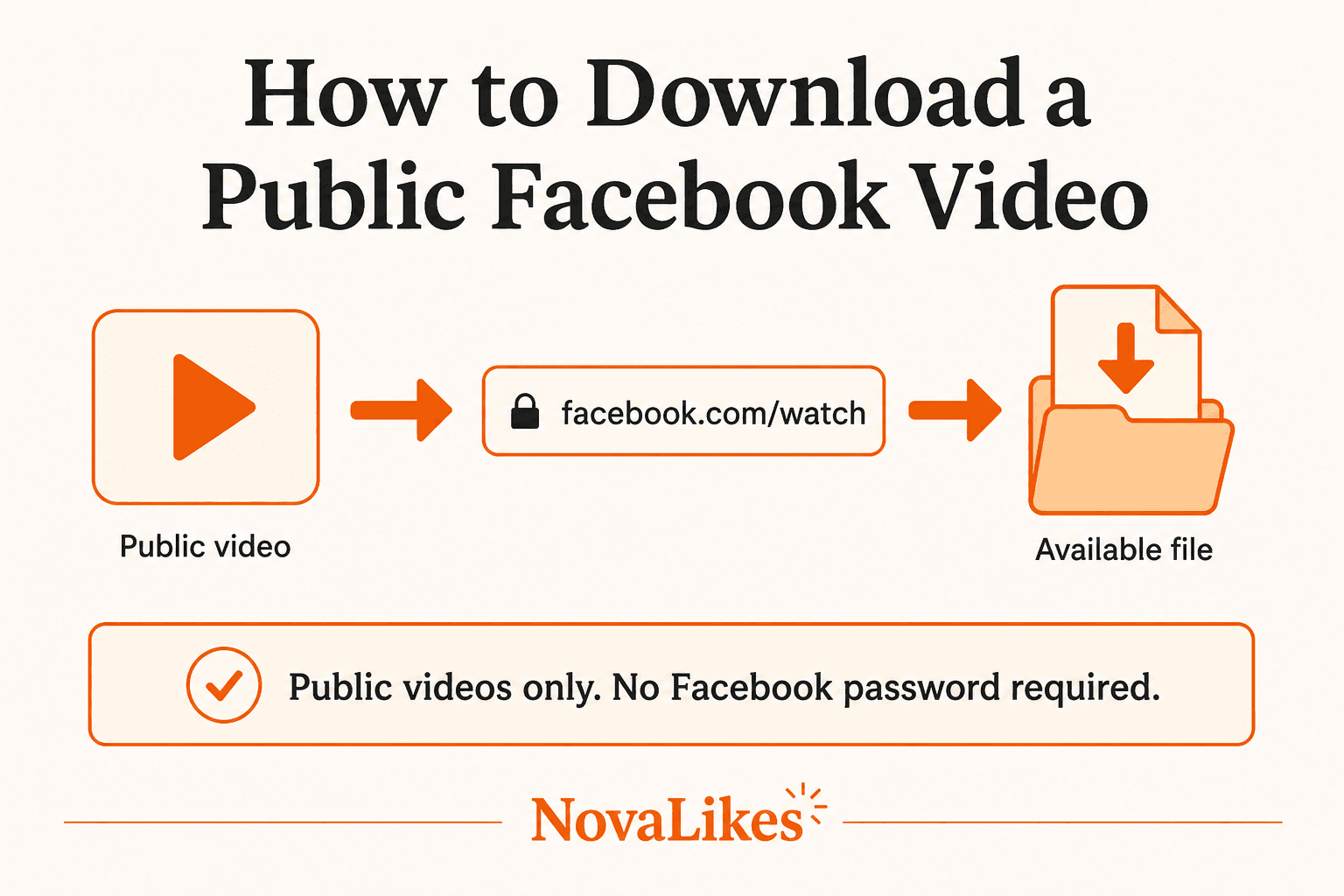
For an ordinary public Facebook video, a downloader can be useful when Facebook exposes a downloadable media source for that public post.
The Facebook Video Downloader is designed for that specific task: a public Facebook video URL, a check of the available media, the video quality Facebook exposes, and a download of the available file.
It does not need to turn a private video into a public one.
And it should never be marketed as a way to bypass Facebook privacy.
The simplest rule: publicly viewable does not mean every Facebook video is technically downloadable in every quality.
At a glance
- Facebook Save video keeps the clip in saved Facebook items for later viewing
- Device download saves an available video file on your device
- Public Facebook videos can be seen by anyone, including people off Facebook
- Restricted videos stay controlled by the publisher's audience setting
- NovaLikes works with supported public Facebook video URLs when Facebook exposes usable media
What Does a Public Facebook Video Mean?
Facebook lets users choose who can see content through its audience selector.
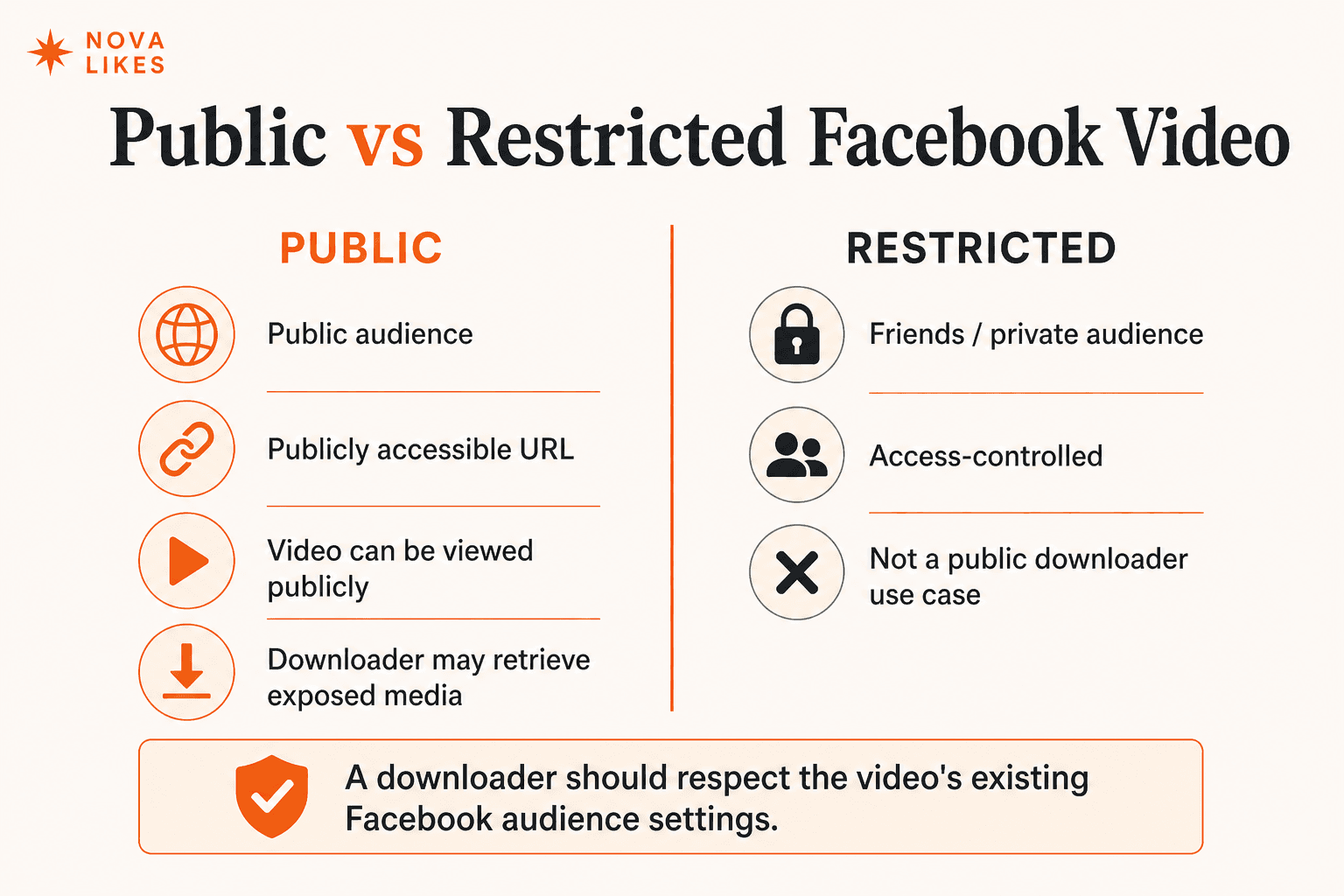
Meta says that when something is shared as Public, anyone can see it, including people who are not Facebook friends and people outside Facebook. (Facebook)
Other audience options can restrict access.
For example:
- Friends limits content to friends.
- Only Me restricts it to the account owner.
- Other contextual audience controls can also apply depending on where the content is posted.
Facebook documents those audience choices separately from the Public setting. (Facebook)
This matters for downloading.
A public downloader should work with media that is actually publicly accessible rather than trying to defeat an account's audience restrictions.
Public availability is also not the same as Facebook Page reach. A public video can be seen by anyone who is allowed to open it, while reach measures how many people actually saw Page-related content. Our guide on how Facebook Page reach works explains that delivery question separately.
How to Download a Public Facebook Video With NovaLikes
The basic process is straightforward.
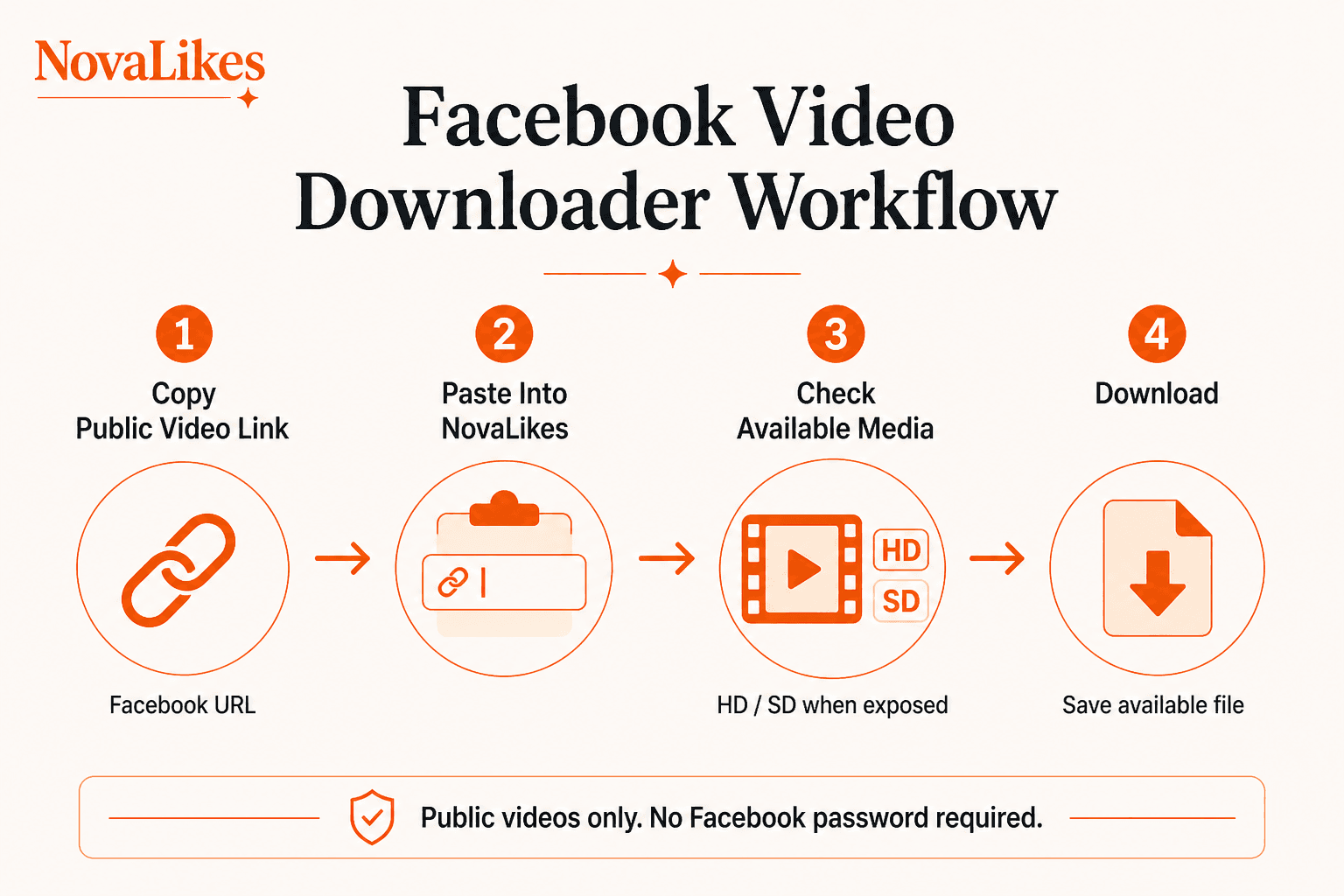
Step 1: Find the Facebook Video
Open the public Facebook video you want to save.
Make sure you can actually view it normally.
If Facebook itself says the content is unavailable, you do not have permission, or the post is restricted, do not expect a public downloader to bypass that restriction.
Facebook audience controls determine who can see shared content. (Facebook)
Step 2: Copy the Video Link
Use Facebook's normal sharing or link controls to copy the URL associated with the video.
NovaLikes can work with supported Facebook video URLs, including supported Facebook watch short links.
Step 3: Open the Facebook Video Downloader
Open the Facebook Video Downloader on NovaLikes.
Step 4: Paste the Facebook Video URL
Paste the public video link into the downloader.
Step 5: Start the Extraction
The tool checks the URL and attempts to locate the media that Facebook publicly exposes for that video.
Step 6: Choose an Available Quality
Depending on the source video and what Facebook exposes, the tool can return available options such as HD or SD.
Not every video necessarily exposes both.
Step 7: Download the File
Choose the available result you want and save the video to your device.
No Facebook password should be required for this public-video workflow.
What Is the Difference Between Saving and Downloading a Facebook Video?
This causes a lot of confusion.
Save Video
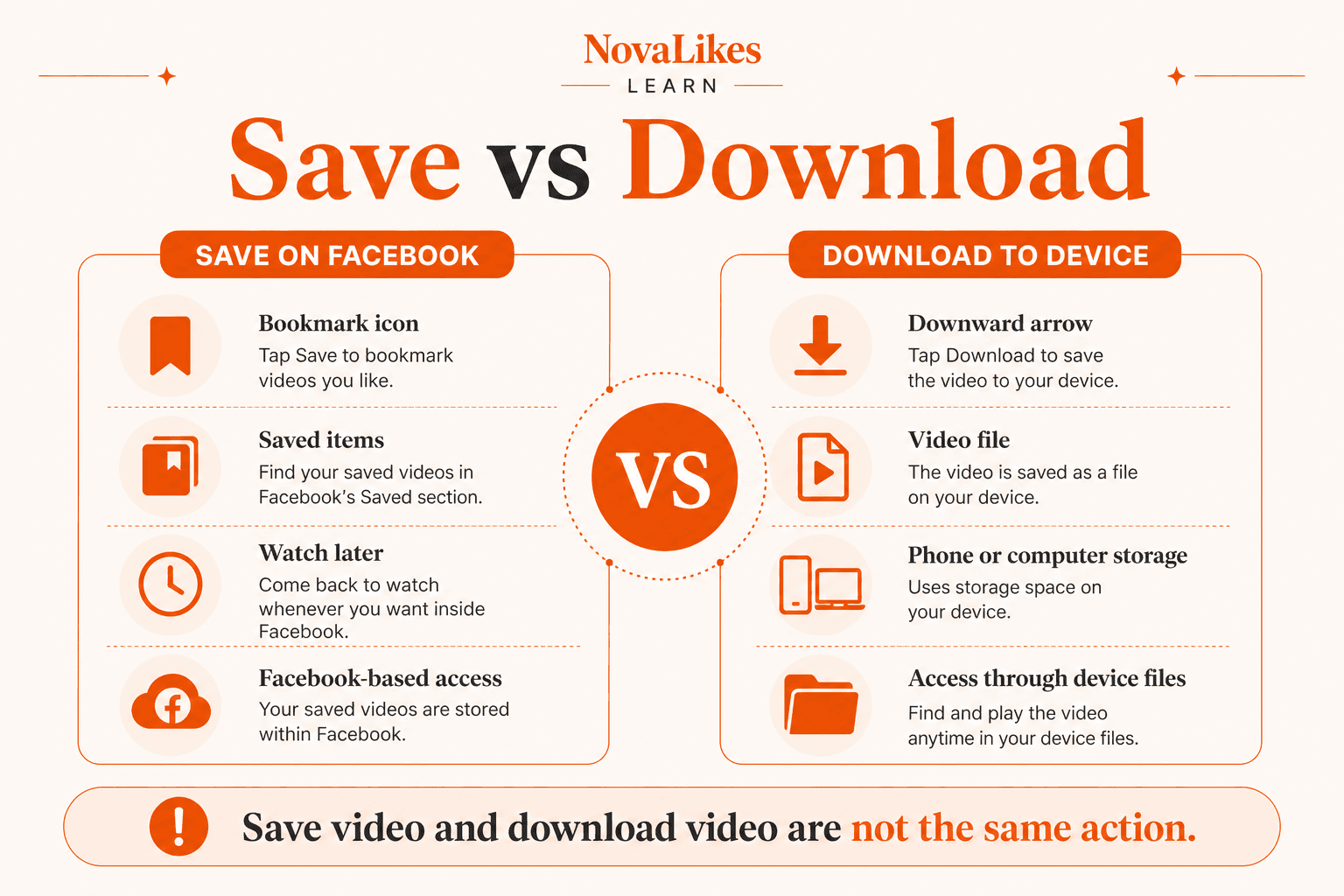
Facebook's built-in Save video function stores the video in your saved Facebook content so you can return to it later. Meta specifically describes saving Reels and videos as a way to view them later. (Facebook)
It does not necessarily create a normal video file in your Downloads folder.
Download Video
A download saves an available video file to the device or another selected storage location.
That's what a Facebook Video Downloader is meant to help with.
So Save is a bookmark inside Facebook, while Download is a video file on your device.
They solve different problems.
| Action | What it does |
|---|---|
| Save video | Later viewing inside Facebook |
| Download video | An available file on your device |
| Public audience | Anyone can see it, including people off Facebook |
| Friends or Only Me | Restricted to the selected audience |
Can Facebook Download Videos Natively?
For some situations, yes.
But you need to distinguish between your own content and someone else's public content.
Meta currently documents the ability to download a Reel you shared to Facebook. It also documents downloading your own Facebook LIVE video after the stream has ended. (Facebook)
Facebook also lets users export copies of their own Facebook information and select media quality during an export. (Facebook)
These are legitimate first-party options for your own content.
For another creator's ordinary public video, Facebook's general Save feature is primarily designed around returning to the content later inside Facebook. (Facebook)
That is where a public-video downloading utility can serve a different purpose.
Can You Download Your Own Facebook Reel?
Yes.
Meta currently documents a native option for downloading a Reel you've shared to Facebook to your device. Meta notes that download options can differ depending on whether the Reel was posted before or after September 2025. (Facebook)
If you simply want a copy of your own Reel, use Facebook's native option when it is available.
There is no need to make an external tool the first choice for a function Facebook already provides directly.
Can You Download Your Own Facebook LIVE Video?
Yes.
Meta documents downloading an ended Facebook LIVE video from your video library. (Facebook)
Again, if it is your own LIVE recording, Facebook's native download workflow may be the simplest option.
A public Facebook Video Downloader is more relevant when you are working with a normal publicly accessible video URL rather than exporting your own account content.
Can You Download Someone Else's Public Facebook Video?
Technically, a public downloader can attempt to retrieve media that Facebook publicly exposes for the URL.
But two separate questions matter:
- Can the file be technically retrieved?
- Do you have the right to reuse it?
Those are not the same thing.
Facebook being able to display a public video does not transfer copyright ownership to everybody who can watch it.
Meta says Facebook does not claim ownership of users' content; users retain rights in the content they create while granting Meta the licenses necessary to operate its services. (Facebook)
Meta also says Facebook's terms do not allow people to post content that violates another person's intellectual-property rights. (Facebook)
So downloading for legitimate personal use and republishing somebody else's video as your own are different questions.
Does Public Mean Copyright-Free?
No.
This is an important distinction.
A Facebook creator can choose Public as the audience, which means the post can be seen broadly. (Facebook)
That setting controls visibility.
It does not automatically remove copyright, ownership, licensing, trademark or other rights.
Meta recommends getting permission from the author before posting someone else's copyrighted work when necessary. (Facebook)
So Public means publicly viewable. It does not mean free for anyone to copy, sell or repost.
When Is Downloading a Facebook Video Reasonable?
Examples can include:
- saving your own media,
- keeping a permitted offline copy,
- preserving a video when the creator has allowed you to,
- downloading company content you manage,
- keeping an authorized training or reference copy,
- or saving content you have the rights to use.
The exact copyright rules can vary by jurisdiction and use case, so the downloader should not pretend to provide universal legal permission.
The safe principle is: download only content you're entitled to save or use.
Meta maintains copyright reporting and intellectual-property enforcement systems when rights holders believe their work has been used without permission. (Facebook)
Can You Download a Private Facebook Video?
No. NovaLikes should not be used as a private-video bypass.
A video restricted to Friends, a private audience or another access-controlled context is not the intended use case for the public Facebook Video Downloader.
Facebook's audience settings exist specifically to control who can view a post. (Facebook)
Do not treat the tool as a way to download private Facebook videos, bypass Facebook privacy, unlock Friends-only videos or download any hidden Facebook video.
Those claims would conflict with the tool's actual public-media purpose.
Can You Download Videos From a Private Facebook Group?
Content inside a private group has different access rules from a public post.
Meta says photos and videos in public groups are visible to the group's public audience, while content in private groups is available only to group members. (Facebook)
So a public Facebook downloader should not be presented as a way to join a private group, authenticate as another user or bypass membership requirements.
If the video is not available publicly, it is outside the normal NovaLikes public downloader use case.
Can You Download a Facebook Video Without Logging In?
If Facebook exposes the video publicly and the NovaLikes extractor can access its media without authentication, the downloader can process that public source without asking the user for a Facebook password.
Facebook itself defines Public content as viewable by anyone, including people off Facebook. (Facebook)
However, Facebook can change its public web experience, media exposure, redirect behaviour and technical delivery.
So do not turn this into a promise that every public Facebook video will always download without login forever.
The accurate promise is: no Facebook password is required for the NovaLikes public-video downloader workflow.
Do You Need to Install an App?
No separate NovaLikes desktop application or browser extension is required for the normal web-tool workflow.
Use a browser, a Facebook video URL, the NovaLikes downloader and the available download result.
Do not expect a Chrome extension, Android app, iPhone app or desktop program unless NovaLikes actually releases one.
Does It Work on Mobile?
The normal NovaLikes web-tool workflow is designed to work through the website.
On mobile, copy the Facebook video URL, open the tool, paste the link, retrieve the available media, then use the browser or device download behaviour.
The exact location where the finished file appears can vary by browser, operating system and device download settings.
Avoid assuming one universal folder location.
Can You Download Facebook Videos in HD?
Sometimes.
NovaLikes can show HD and SD options when Facebook exposes those media variants for the requested video.
HD cannot be guaranteed for every URL.
The source video may not have been uploaded in HD, may have different available renditions, or may not expose the expected media format.
So the tool copy should say HD or SD when available, rather than claiming every Facebook video downloads in full HD.
What Is Facebook SD Video?
SD means a lower-resolution version of a video compared with an available higher-definition version.
For some Facebook video URLs, the publicly exposed media may include HD, SD, both or another available rendition.
The downloader should present what actually exists.
It should not fabricate 4K, 1080p or HD labels when the media source does not support them.
Can You Download Facebook Videos in 4K?
Only if a legitimately retrievable source of that quality actually exists and the tool supports it.
NovaLikes should not market the current Facebook Video Downloader as a 4K Facebook Downloader unless that functionality has actually been verified.
Current positioning should remain: available HD and SD options when exposed.
That is more accurate than turning every input into a fake 4K button.
Why Is Only SD Available?
Possible technical reasons include:
- the source upload,
- the available Facebook rendition,
- or what Facebook currently exposes for that particular URL.
The downloader cannot create an HD source just because the user asks for one.
If only SD is actually exposed, display SD.
Do not upscale it and label the result Original HD unless it really is.
Why Does the Facebook Video Downloader Sometimes Fail?
A failed request does not always mean the tool is broken.
Possible reasons include:
- the video is no longer public,
- the post was removed,
- the URL is malformed,
- Facebook changed the page or media structure,
- the media is not currently exposed,
- or the video belongs to an unsupported or restricted context.
NovaLikes already has specific tool behaviour for cases where media is not exposed.
The correct response is to show a clear error, not to generate a fake download file.
What Does Media Not Exposed Mean?
It means the tool found the Facebook page or request context but could not obtain a usable public video source from it.
That distinction matters.
A page existing does not guarantee the underlying downloadable media is exposed in a way the tool can safely retrieve.
If that happens, try checking whether the original video still plays publicly, confirm the URL, and try again later if appropriate.
Do not ask users for their Facebook password, cookies, session tokens or a browser-login export to force the download.
Why Does a Facebook Video Link Say It Is Unavailable?
The creator may have deleted the content, changed its audience, restricted access, or Facebook may have removed it.
Facebook allows people to change the audience of posts after publishing them. (Facebook)
So a URL that was public yesterday may not remain public forever.
A downloader should respect the video's current accessibility.
What If a Public Video Becomes Private After I Save the Link?
The current Facebook audience setting matters.
Meta lets publishers change who can see past posts. (Facebook)
So previously public does not guarantee currently public.
If the creator restricts the post later, NovaLikes should not claim it can bypass the new privacy setting simply because the old URL still exists.
Do Facebook Watch Short Links Work?
NovaLikes supports valid Facebook watch short links in the Facebook video extraction flow.
A short Facebook URL can redirect to the underlying Facebook video or post.
The tool validates and follows supported Facebook redirects under its existing security rules before attempting extraction.
If the redirect does not resolve to supported public media, the tool should return an error rather than fetching arbitrary external URLs.
Can You Paste Any Website URL Into the Downloader?
No.
The Facebook Video Downloader should remain Facebook-specific.
The existing extractor uses platform-aware URL handling rather than becoming a generic download-anything-from-the-internet proxy.
This is important for security, host allowlisting and predictable behaviour.
Users should paste a supported Facebook video URL.
Do not paste Google Drive, YouTube, Dropbox, random file hosts or internal network URLs.
Facebook Video vs Facebook Reel
Facebook's video ecosystem now includes Reels alongside other video content.
Meta has increasingly integrated video into Reels experiences, but user search intent still differs.
Download Facebook video and download Facebook Reel are separate useful tasks.
NovaLikes therefore keeps a Facebook video tool and a Facebook Reels tool as separate user-facing pages.
Do not automatically redirect every Video Downloader search to the Reels page.
Give users the tool matching what they are trying to save.
Can You Download a Facebook Reel With the Video Downloader?
If you specifically have a Reel, use the Facebook Reels Downloader rather than expecting universal Reel handling through the ordinary video tool.
The current NovaLikes video page is for watch links and page video paths. Reel-style links belong on the Reels downloader.
That creates clearer UX, clearer SEO intent and more accurate expectations.
The dedicated Facebook Reel downloading guide explains that workflow separately.
Can You Download Facebook Live Videos?
There are two situations.
Your Own LIVE
Meta provides a native workflow for saving or downloading your own ended Facebook LIVE video. (Facebook)
Someone Else's Public LIVE Recording
If the ended recording exists as publicly accessible supported video content and Facebook exposes usable media, a downloader may be able to process it.
Do not promise support for currently running livestreams, private LIVE broadcasts or content Facebook does not expose.
The current NovaLikes tool is a video downloader, not a LIVE stream recorder.
Can You Download an Ongoing Facebook LIVE?
Do not position the tool as a stream-recording service.
Downloading an existing video file and recording an active stream are technically different jobs.
NovaLikes should focus on supported existing public video media rather than real-time stream capture.
If Facebook later publishes the LIVE as a normal available recording, that is a different situation.
Can You Download Facebook Stories?
No claim should be made here.
The Facebook Video Downloader is not a Facebook Story Downloader.
Meta has separate Story features and even provides creators with native options for saving their own archived Stories to a device. (Facebook)
NovaLikes should not expand tool claims beyond what has actually been built and tested.
Does Downloading a Video Remove Its Watermark?
Do not expect that.
The downloader should retrieve the available media.
If the source contains branding, text, logos, captions or embedded marks, the tool should not pretend to remove them.
Download video and remove watermark are separate functions.
NovaLikes does not need to invent a watermark-removal service here.
Does Downloading Change the Video Quality?
The downloader should save an available media rendition.
It should not claim to enhance, restore or upscale the content unless a separate verified process exists.
If Facebook exposes HD, offer HD.
If only SD is exposed, offer SD.
Keep the downloaded result aligned with the actual available source.
Can a Downloader Recover a Deleted Facebook Video?
No.
A current downloader should not be marketed as an archive, deleted-video recovery system, cache explorer or Facebook history database.
If the video is deleted and no supported public media remains available, the tool should fail clearly.
Do not fabricate historical copies.
Can a Downloader Recover a Removed Copyright Video?
No.
If Facebook removes content because it is unavailable or subject to enforcement, a downloader should not be presented as a mechanism for defeating that action.
Meta operates copyright reporting and intellectual-property enforcement systems across Facebook. (Facebook)
The tool works with currently accessible supported public media.
Is It Safe to Give a Facebook Downloader Your Password?
You should not need to provide your Facebook password for NovaLikes' public video downloader.
Be particularly careful with tools that ask you to paste Facebook credentials, session cookies, two-factor codes or browser authentication data just to process a public video.
NovaLikes' current workflow is built around public video extraction, not account takeover or authenticated scraping.
Does NovaLikes Store My Facebook Password?
There is no Facebook password field in the downloader workflow because the tool does not need your Facebook password.
That is a much stronger design than asking for a password and then asking you to trust the site.
For a public video, paste the public video URL.
Nothing more should be necessary from the user's Facebook account.
Can the Tool Download Every Facebook Video?
No.
Avoid that claim.
The accurate wording is: the tool can download supported public Facebook videos when Facebook exposes usable video media.
It may fail when content is private, media is unavailable, the post was removed, Facebook blocks or exposes the page differently, or the URL is unsupported.
A good downloader tells the truth when a video cannot be retrieved.
Does Facebook Notify the Creator When You Download a Public Video?
Meta documents ordinary actions such as saving content for later viewing, but the current official sources reviewed here do not establish a universal creator notification specifically for third-party retrieval of publicly exposed video media. (Facebook)
Therefore do not write an absolute claim that the creator can never know you downloaded it.
NovaLikes does not need that promise.
The tool's benefit is retrieving available public media without requiring a Facebook password, not guaranteed invisible activity.
Can You Download Videos From a Facebook Page?
If the Page's video is currently public and the media is supported and exposed, it is an appropriate input for the public-video downloader.
Facebook Pages commonly publish public-facing video content, but individual posts still operate under Facebook's visibility and content systems. (Facebook)
So the relevant question is whether this specific video is publicly accessible, not merely whether it is posted by a Page.
Can You Download a Video From a Facebook Profile?
The same principle applies.
If the user selected Public for that video or post, Public means anyone can see it, including people off Facebook. (Facebook)
If it is Friends-only, Only Me or otherwise restricted, the public downloader should not be presented as a privacy bypass. (Facebook)
Facebook Video Quality Depends on the Source
Users sometimes expect Original HD for every video.
But the downloader only has access to the media rendition that is actually available.
A low-quality upload cannot be converted back into an untouched high-quality camera source through ordinary downloading.
So describe options as HD when available and SD when available, rather than Original quality guaranteed.
Why Is the Downloaded Video Smaller Than Expected?
File size depends on things such as video duration, resolution, encoding, bitrate and the source rendition.
A one-minute SD clip and a ten-minute HD video should not be expected to have identical file sizes.
Do not use file size alone to decide that this video must be fake or that it cannot be HD.
Resolution and actual playback properties are more useful than one universal file-size assumption.
What Can You Do After Downloading a Video?
That depends on your rights to the content.
Legitimate examples could include:
- offline viewing,
- keeping your own business content,
- authorized editing,
- archiving material you own,
- or using the file in a workflow the copyright owner has permitted.
But downloading does not automatically give permission to remove attribution, re-upload another creator's work, sell it, run ads with it or impersonate its creator.
Meta's Terms preserve creators' rights in the content they create, and Meta maintains intellectual-property enforcement processes. (Facebook)
Can You Repost a Downloaded Facebook Video?
Only if you have a legitimate basis to do so.
Meta advises users to avoid posting copied content they do not have the right to post and operates copyright reporting systems for rights holders. (Facebook)
Possible legitimate situations include:
- you created it,
- the owner gave permission,
- the license allows the intended use,
- or another applicable legal basis exists.
The downloader itself should not make the copyright decision for the user.
Facebook Downloading for Your Own Business Content
One of the clearest use cases is your own material.
A business might need a copy of a video previously posted to its Page, a completed LIVE recording, an old campaign asset or content being reused in an authorized company archive.
For broader exports, Facebook provides tools for downloading copies of Page and profile information, and creators can download certain own-content types directly. (Facebook)
Use Facebook's native export or download options first when they fit your use case.
Use the NovaLikes downloader when you simply have a supported public video URL and need the exposed media file.
View Later or Keep a File?
Ask one question: why do I need this video?
If the answer is that you just want to watch it again later on Facebook, use Facebook's native Save video feature. (Facebook)
If the answer is that you need an actual available file on your device, and you have the right to save it, then use a video download workflow.
That distinction can save a lot of unnecessary work.
Download a Public Facebook Video
This article has strong direct tool intent, so the next step is the free downloader rather than a Facebook follower or Like package.
How to Download a Public Facebook Video: Simple Version
Use this process:
- Open the public Facebook video.
- Copy its link.
- Open the NovaLikes Facebook Video Downloader.
- Paste the URL.
- Let the tool check the publicly exposed media.
- Choose HD or SD when available.
- Download.
If the video is private, deleted, unavailable, or Facebook does not expose usable media, the tool should show an honest error instead of pretending the download succeeded.
And remember: being able to download a public file does not give you ownership of somebody else's content. Meta retains a copyright and intellectual-property framework for Facebook content and does not take ownership away from creators merely because they post it to Facebook. (Facebook)
Key Takeaways
- Facebook's native Save video feature saves content for later viewing inside Facebook; it should not be confused with downloading a video file to your device.
- Facebook defines Public audience content as content anyone can see, including people off Facebook.
- Facebook lets publishers select and later change the audience for posts, so a video's accessibility can change.
- Meta provides native download options for some content you own, including your own shared Reels and ended LIVE videos.
- NovaLikes' Facebook Video Downloader is for supported publicly accessible videos; it should not be presented as a private-content bypass.
- HD and SD should only be offered when those media options are actually available.
- A downloader should not ask for a Facebook password to process supported public video media.
- Publicly visible does not mean copyright-free. Meta says users retain rights in their content and prohibits intellectual-property infringing content on Facebook.
- Downloading and republishing are separate actions; permission or another legitimate legal basis may be needed for reuse.
Frequently asked questions
How can I download a public Facebook video?
Copy the public Facebook video URL, open the NovaLikes Facebook Video Downloader, paste the link and check the available video options. The tool can return supported media such as HD or SD when Facebook exposes those versions.
Is Facebook Save Video the same as downloading?
No. Facebook describes Save video as a way to save videos inside Facebook for later viewing. Downloading means saving an actual available video file to your device.
Can I download Facebook videos in HD?
When Facebook exposes an HD version and the tool can retrieve it, NovaLikes can show an HD option. HD should not be guaranteed for every video.
Can I download a private Facebook video?
The NovaLikes tool should only be used for supported public Facebook videos. Facebook uses audience controls such as Public, Friends and Only Me to restrict who can see posts.
Can I download a Facebook video without logging in?
For supported publicly accessible media, the NovaLikes downloader does not require your Facebook password. Facebook defines Public content as viewable even by people off Facebook.
Can Facebook download my own videos?
Meta provides direct download and export options for several types of your own content, including your own shared Reels, ended LIVE videos and Facebook information exports.
Does a public Facebook video mean I can repost it anywhere?
No. Public controls who can see the video, not who owns it. Meta says creators retain rights in their content and prohibits intellectual-property infringement.
Why can't the downloader find my Facebook video?
The video may no longer be public, the URL may be invalid, Facebook may not expose usable video media, or the content may have been deleted or restricted. Facebook lets publishers change a post's audience after publishing.
Does NovaLikes need my Facebook password?
No. The public Facebook Video Downloader workflow does not require your Facebook password.
Can I use a Facebook watch short link?
NovaLikes supports valid Facebook watch short links in its current Facebook video extraction flow. If the redirect does not lead to supported public media, the tool should return an error rather than fabricate a download.
Related guides
Facebook
How Facebook Page Reach Works in 2026
A Facebook Page can have thousands of followers without every post reaching thousands of people.
Facebook
How to Download a Public Facebook Reel
Facebook Reels are now a much bigger part of Facebook's overall video experience.
Facebook
Facebook Followers vs Page Likes vs Post Likes: What’s the Difference?
Facebook uses several similar-looking terms around Pages and posts: Followers, Page Likes and Post Likes.
Download a Public Facebook Video
Paste a supported public Facebook video link to check the available video options. HD or SD may be shown depending on what Facebook exposes for the source.
Open Facebook Video Downloader